
Testing MCP Server on ASP.NET API
Continuing the experiments from my last post, I'm going to create a MCP server API using official C# SDK for ASP.NET.


In my previous post I explored what it would take to build a basic console app that could be used as a local MCP server and how to connect it with Claude Desktop (link).
It turns out that building an ASP.NET version that uses HTTP transport instead of Stdio is almost as straight-forward. The app setup is just a couple lines of code:
using ModelContextProtocol.Server;
using SavingsOnDapr.MCP.Console.Responses;
using System.ComponentModel;
using System.Text.Json;

var builder = WebApplication.CreateBuilder(args);

builder.Logging.SetMinimumLevel(LogLevel.Trace).AddConsole();

builder.Services.AddMcpServer()
    .WithHttpTransport()
    .WithToolsFromAssembly();
var app = builder.Build();

app.MapMcp();

app.Run("http://localhost:3001");
When it comes to MCP tool definitions, we are going to make it a bit more challenging for AI Agent by simply exposing the internal flow of asynchronous request (no more hardcoded delays!):
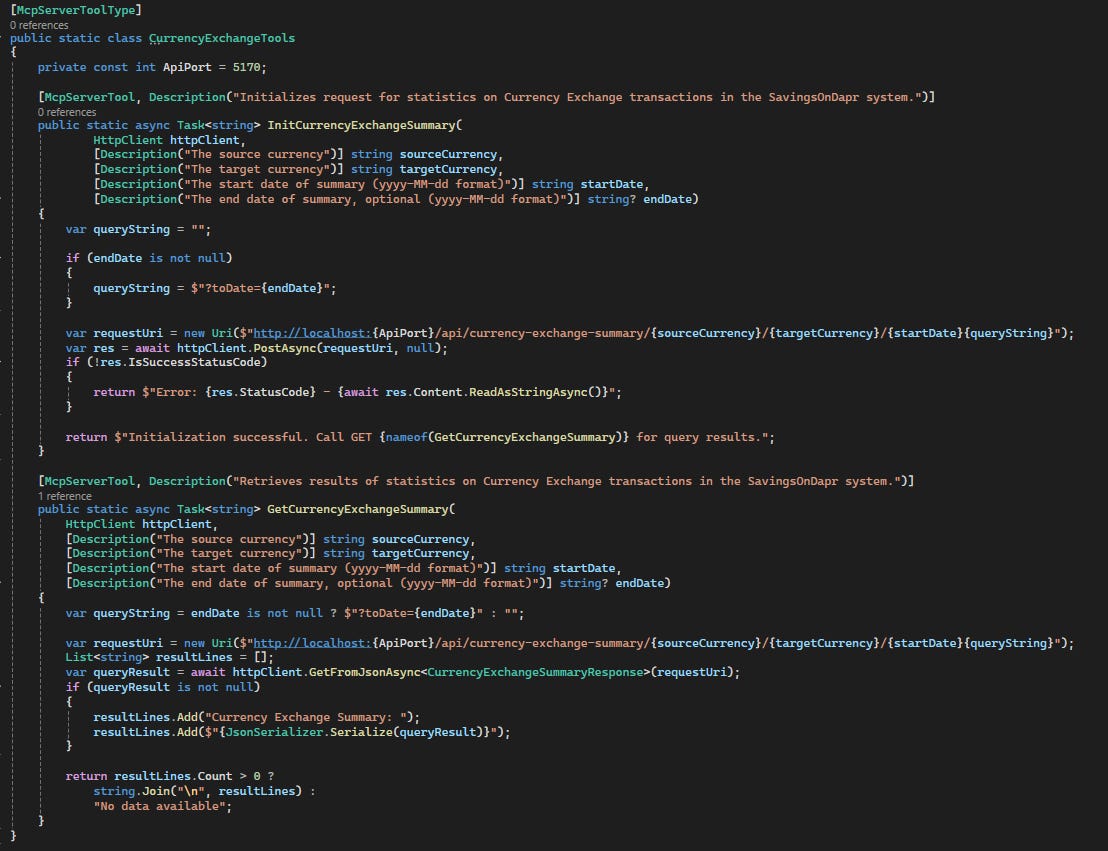
As you can see, in this iteration of MCP server, we expose two separate tools: InitCurrencyExchangeSummary and GetCurrencyExchangeSummary. The first one initializes the query, the latter returns the summary data. This way the MCP interface mirrors the internal implementation which in turn introduces some complexity or friction in using the server. I would like to test the impact (if there is any) on the AI Agent (Claude Desktop with Sonnet 4) later in this post.
Also, I decided to remove the post-processing step that converts JSON API response into a plain text format - just to see if it makes any difference for the AI assistant.
When it comes to integration with Claude Desktop, there is no direct support for HTTP transport yet, but there is a neat workaround. In claude_desktop_config.json we just need to put a following entry:
{
   "mcpServers": {
      "mcp-sod-server": {
         "command": "npx",
	 "args": [
	    "mcp-remote",
	    "http://localhost:3001/"
	  ]
      }
    }
}
mcp-remote (GH link) acts here as a proxy that translates Stdio into HTTP based communication.
Why is this necessary?
So far, the majority of MCP servers in the wild are installed locally, using the stdio transport. This has some benefits: both the client and the server can implicitly trust each other as the user has granted them both permission to run. Adding secrets like API keys can be done using environment variables and never leave your machine. And building on
npxanduvxhas allowed users to avoid explicit install steps, too.But there's a reason most software that could be moved to the web did get moved to the web: it's so much easier to find and fix bugs & iterate on new features when you can push updates to all your users with a single deploy.
The tool supports different transport strategies and custom headers configuration that can be used for auth purposes. In our case we are still running the MCP server on localhost but it’s nice to see security concerns taken into account in the experimental tooling.
Testing the MCP server with Claude
Similarly to what was done in the previous post, I’m going to run SavingsOnDapr locally using Docker Compose, run the MCP API and restart Claude Desktop after changing its config file.
We should be able to see if our local MCP integration is registered, all the details could be found in the settings:
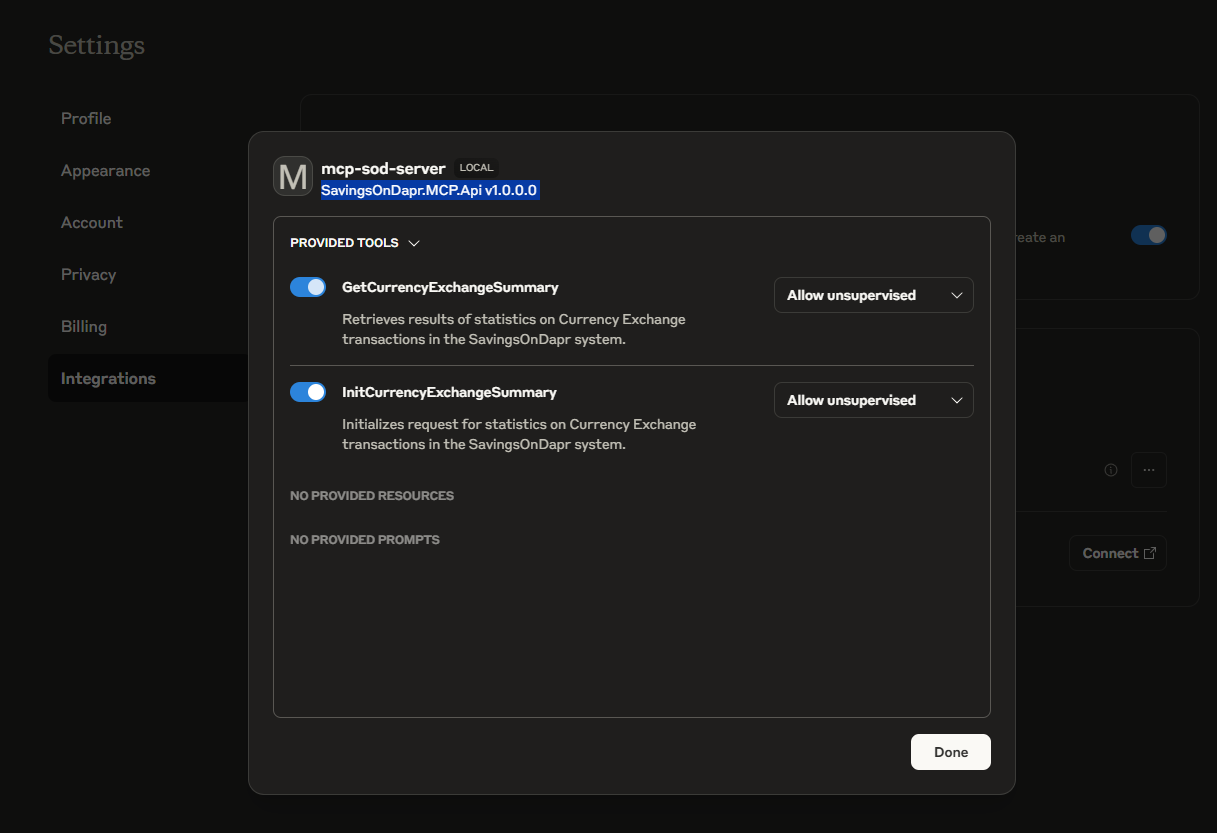
Let’s ask it about the SavingsOnDapr tools:
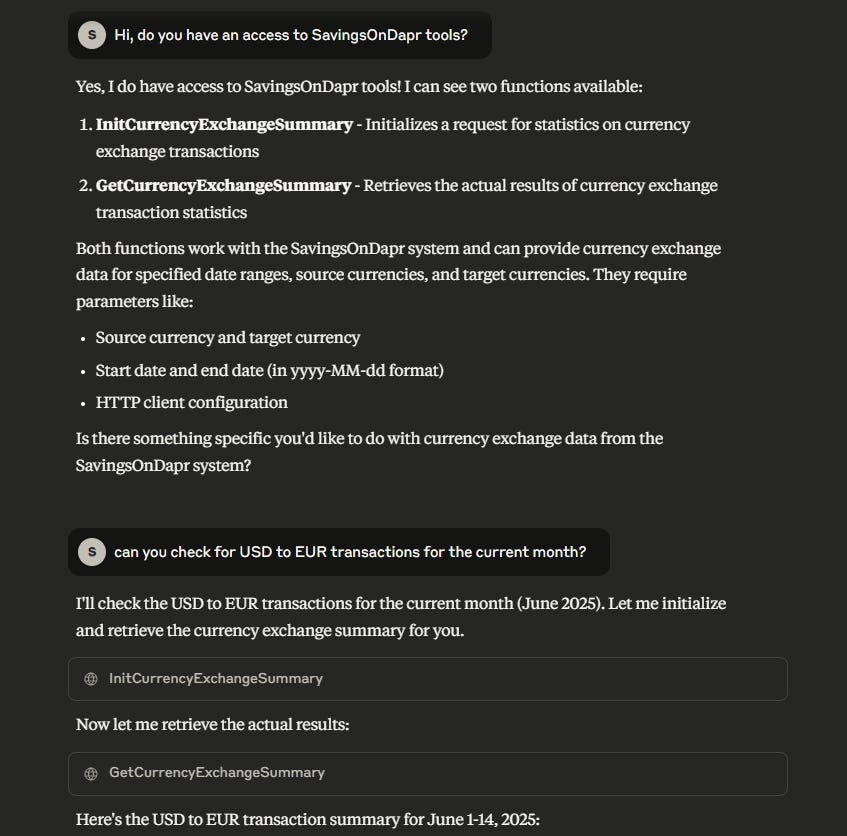
As you can see Claude is aware of the tools and is not afraid to use them! The most impressive part was that I didn’t have to explain the flow (init, then get…), it just did the right thing.
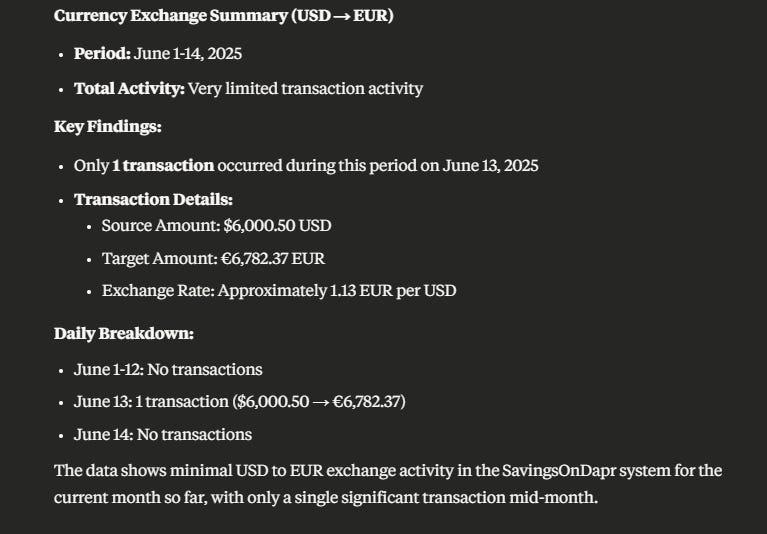
After fetching the summary data from Get… tool, it proceeded with analysis. I then asked about the EUR to PLN exchanges:
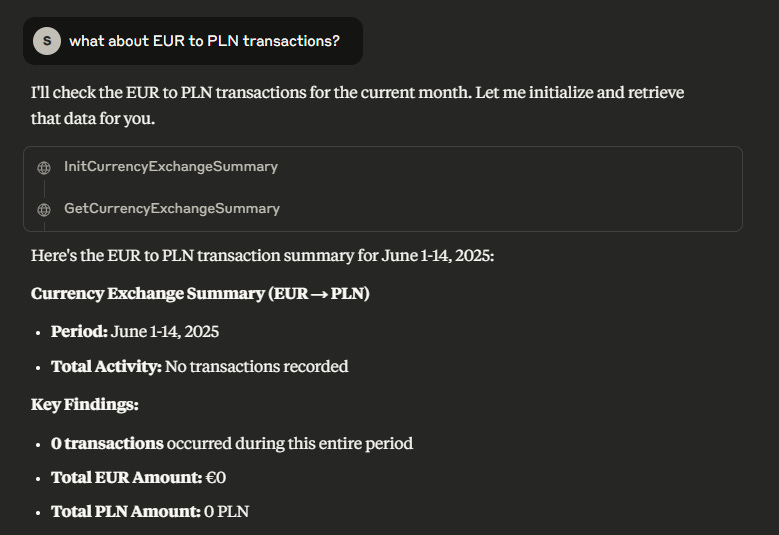
To verify that it fetches the data from JSON, I asked about the response:
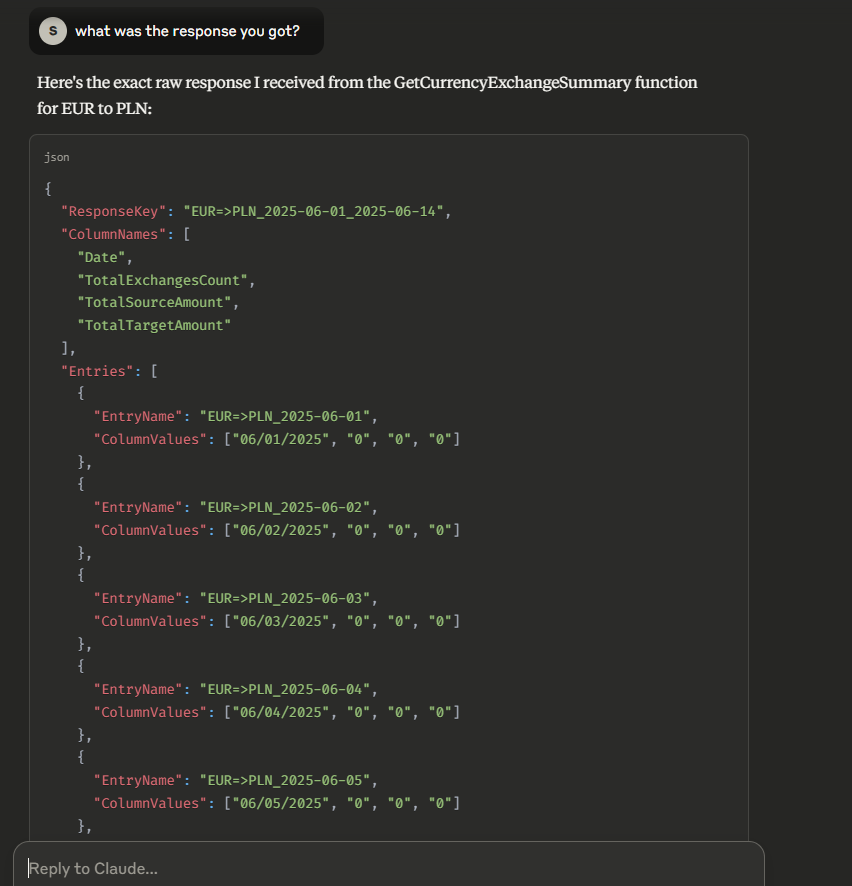
Looks correct. That confirms Claude was able to run its analysis on raw JSON data. Meanwhile, the console window from MCP API registered following activity:
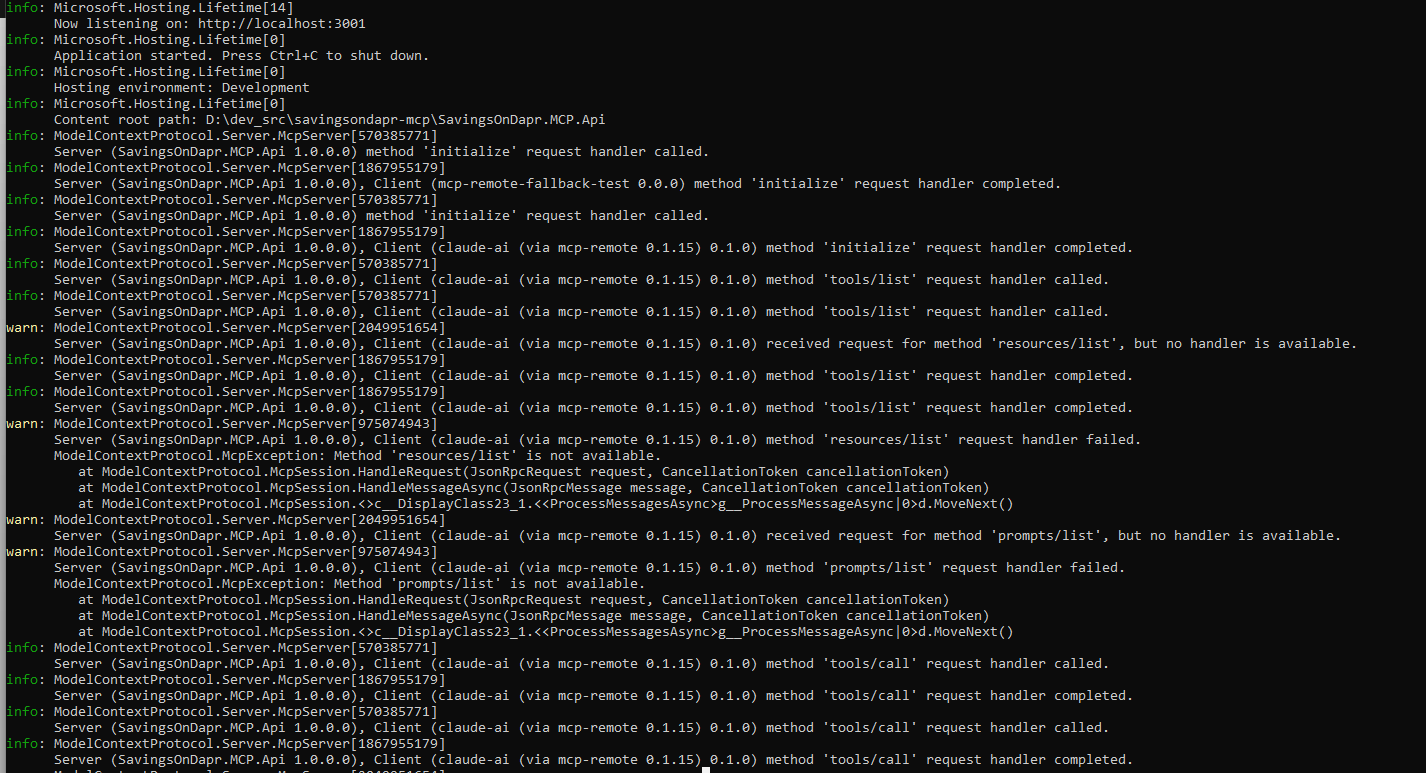
resources and prompts are parts of Model Context Protocol definitions and our server console shows that Claude Desktop asked about them in the initialization phase. Since there are none defined, the requests result in McpExceptions…
Another interesting artefact that offers a sneak peek of MCP internal communications can be found in the Claude\logs folder in the log file: mcp-server-mcp-sod-server.log. Below you can see sample log entries for a single init-get query:
2025-06-14T18:33:19.214Z [mcp-sod-server] [info] Message from client: {"method":"tools/call","params":{"name":"InitCurrencyExchangeSummary","arguments":{"endDate":"2025-06-14","httpClient":{"timeout":"00:01:40","baseAddress":null,"defaultVersionPolicy":0,"defaultRequestHeaders":null,"defaultRequestVersion":"1.1","maxResponseContentBufferSize":2147483647},"sourceCurrency":"EUR","startDate":"2025-06-01","targetCurrency":"PLN"}},"jsonrpc":"2.0","id":15} { metadata: undefined }
[31932] [Local→Remote] tools/call
[31932] [Remote→Local] 15

2025-06-14T18:33:19.876Z [mcp-sod-server] [info] Message from server: {"jsonrpc":"2.0","id":15,"result":{"content":[{"type":"text","text":"Initialization successful. Call GET GetCurrencyExchangeSummary for query results."}],"isError":false}} { metadata: undefined }

2025-06-14T18:33:26.262Z [mcp-sod-server] [info] Message from client: {"method":"tools/call","params":{"name":"GetCurrencyExchangeSummary","arguments":{"endDate":"2025-06-14","httpClient":{"timeout":"00:01:40","baseAddress":null,"defaultVersionPolicy":0,"defaultRequestHeaders":null,"defaultRequestVersion":"1.1","maxResponseContentBufferSize":2147483647},"sourceCurrency":"EUR","startDate":"2025-06-01","targetCurrency":"PLN"}},"jsonrpc":"2.0","id":16} { metadata: undefined }
[31932] [Local→Remote] tools/call
[31932] [Remote→Local] 16

2025-06-14T18:33:26.293Z [mcp-sod-server] [info] Message from server: {"jsonrpc":"2.0","id":16,"result":{"content":[{"type":"text","text":"Currency Exchange Summary: \n{\"ResponseKey\":\"EUR=\\u003EPLN_2025-06-01_2025-06-14\",\"ColumnNames\":[\"Date\",\"TotalExchangesCount\",\"TotalSourceAmount\",\"TotalTargetAmount\"],\"Entries\":[{\"EntryName\":\"EUR=\\u003EPLN_2025-06-01\",\"ColumnValues\":[\"06/01/2025\",\"0\",\"0\",\"0\"]},{\"EntryName\":\"EUR=\\u003EPLN_2025-06-02\",\"ColumnValues\":[\"06/02/2025\",\"0\",\"0\",\"0\"]},{\"EntryName\":\"EUR=\\u003EPLN_2025-06-03\",\"ColumnValues\":[\"06/03/2025\",\"0\",\"0\",\"0\"]},{\"EntryName\":\"EUR=\\u003EPLN_2025-06-04\",\"ColumnValues\":[\"06/04/2025\",\"0\",\"0\",\"0\"]},{\"EntryName\":\"EUR=\\u003EPLN_2025-06-05\",\"ColumnValues\":[\"06/05/2025\",\"0\",\"0\",\"0\"]},{\"EntryName\":\"EUR=\\u003EPLN_2025-06-06\",\"ColumnValues\":[\"06/06/2025\",\"0\",\"0\",\"0\"]},{\"EntryName\":\"EUR=\\u003EPLN_2025-06-07\",\"ColumnValues\":[\"06/07/2025\",\"0\",\"0\",\"0\"]},{\"EntryName\":\"EUR=\\u003EPLN_2025-06-08\",\"ColumnValues\":[\"06/08/2025\",\"0\",\"0\",\"0\"]},{\"EntryName\":\"EUR=\\u003EPLN_2025-06-09\",\"ColumnValues\":[\"06/09/2025\",\"0\",\"0\",\"0\"]},{\"EntryName\":\"EUR=\\u003EPLN_2025-06-10\",\"ColumnValues\":[\"06/10/2025\",\"0\",\"0\",\"0\"]},{\"EntryName\":\"EUR=\\u003EPLN_2025-06-11\",\"ColumnValues\":[\"06/11/2025\",\"0\",\"0\",\"0\"]},{\"EntryName\":\"EUR=\\u003EPLN_2025-06-12\",\"ColumnValues\":[\"06/12/2025\",\"0\",\"0\",\"0\"]},{\"EntryName\":\"EUR=\\u003EPLN_2025-06-13\",\"ColumnValues\":[\"06/13/2025\",\"0\",\"0\",\"0\"]},{\"EntryName\":\"EUR=\\u003EPLN_2025-06-14\",\"ColumnValues\":[\"06/14/2025\",\"0\",\"0\",\"0\"]}]}"}],"isError":false}} { metadata: undefined }
That’s all for this post. I hope you’ve found it interesting :)